To clean dusty animatronics without damaging sensors, gently use compressed air held about six inches away to blow away loose dust, and softly brush stubborn spots with a delicate brush. Lightly dampen microfiber cloths with distilled water for sensitive areas, avoiding excessive moisture that could harm electronics. Be patient and cautious during the process, ensuring dust doesn’t enter internal parts. If you want detailed tips to keep your animatronics in top shape, there’s more to uncover below.
Key Takeaways
- Use compressed air gently from a safe distance to remove dust without damaging sensors.
- Employ soft brushes and lightly dampened microfiber cloths for delicate parts.
- Avoid aggressive scrubbing and excessive moisture to prevent sensor and mechanism damage.
- Regularly inspect and maintain environmental controls like air filtration and humidity to minimize dust buildup.
- Handle cleaning patiently, prioritizing dust prevention strategies to reduce the need for frequent cleaning.
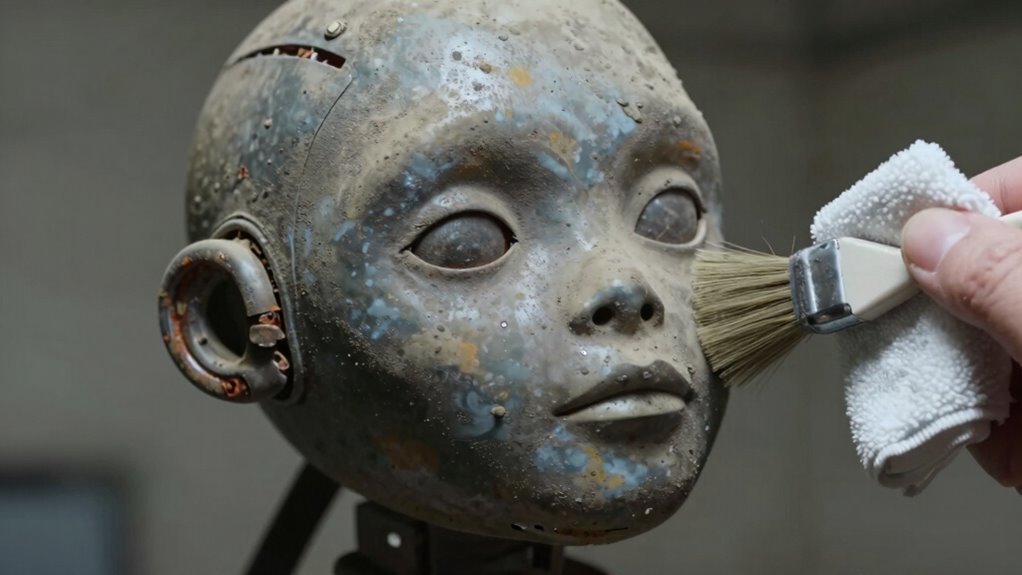
Dusty animatronics have become a fascinating symbol of forgotten amusement parks and abandoned attractions. Their hollow eyes and rusted joints tell stories of a bygone era, but cleaning them without causing damage can be a challenge. You want to restore their former glory without compromising sensitive sensors or intricate mechanisms. To do this, understanding proper restoration techniques is essential, especially when it comes to minimizing dust buildup and preventing future dust accumulation.
When tackling dusty animatronics, your first focus should be on dust prevention. Regularly protecting the figures with covers or enclosures can significantly reduce dust settling on surfaces. If they’re stored indoors, you might consider installing air filtration systems that trap airborne particles, keeping the environment cleaner and less dusty. These preventative measures are key because they lessen the need for frequent cleaning, which can be risky if not done carefully. Additionally, understanding proper cleaning techniques is crucial to avoid damaging delicate parts during maintenance.
Now, when it’s time to clean, you need to be precise. Using compressed air is an effective way to remove dust from hard-to-reach areas, but you should do it gently to avoid damaging sensors or delicate components. Hold the nozzle at a safe distance—about six inches—and keep the airflow light. Soft brushes can also help dislodge stubborn dust without scratching surfaces. For more sensitive parts, a microfiber cloth lightly dampened with distilled water can pick up dust without leaving residue or moisture that could harm electronics. Incorporating dust prevention strategies is just as important as cleaning to maintain their condition over time. Regular inspections and environmental controls such as humidifiers or dehumidifiers can further help manage dust levels effectively, ensuring the animatronics stay in good condition longer. Using airless paint sprayers with proper techniques can also be helpful for cleaning larger surfaces quickly and evenly, provided they are used carefully to prevent overspray.
Restoration techniques should always prioritize the safety of the animatronics’ internal mechanisms. If you notice corrosion or rust, applying rust inhibitors or corrosion removers carefully can help extend their life. However, avoid harsh chemicals that may seep into sensitive parts or damage sensors. When cleaning, use minimal moisture and avoid aggressive scrubbing. Patience is your best tool here; take your time to gently remove dust instead of rushing through the process, which risks sensor misalignment or damage.
Preventing dust from settling in the first place is the most effective long-term solution. Regular inspections and cleanings, combined with environmental controls like humidifiers or dehumidifiers, can keep dust at bay. By maintaining a clean environment and handling each cleaning step with care, you preserve the animatronics’ functionality and appearance. Dust might be a symbol of decay, but with the right techniques, you can restore and protect these fascinating relics for years to come.

WOLFBOX MegaFlow 50 Compressed Air Duster-110000RPM Super Power Electric Air Duster, 3-Gear Adjustable Mini Blower with Fast Charging, Dust Blower for Computer, Keyboard, House, Outdoor and Car
Powerful Turbo Fan:WOLFBOX MegaFlow 50 electric air duster reaches speeds of up to 110,000 RPM, effectively removing dust…
As an affiliate, we earn on qualifying purchases.
As an affiliate, we earn on qualifying purchases.
Frequently Asked Questions
How Often Should I Clean My Dusty Animatronics?
You should clean your dusty animatronics every three to six months, depending on your maintenance schedule and environmental conditions. Regular cleaning helps prevent dust buildup that can interfere with sensors or mechanical parts. Use gentle tools and avoid harsh chemicals to protect delicate components. Adjust your maintenance schedule based on humidity and dust levels in the environment to keep your animatronics functioning smoothly without risking sensor damage.
Can Cleaning Damage Sensitive Animatronic Sensors?
Cleaning your animatronics carefully won’t harm their sensitive sensors if you take precautions. Gentle methods prevent dust ingress, protecting sensor calibration and ensuring smooth operation. Using soft brushes or compressed air, you can remove dust without applying harsh pressure. Keep the cleaning gentle and precise, and you’ll maintain the animatronics’ performance while avoiding any risk of damage. Proper cleaning techniques help preserve their functionality and extend their lifespan.
What Cleaning Products Are Safe for Animatronics?
You should use gentle cleaning techniques with products compatible with your animatronics. Opt for soft cloths or brushes and avoid harsh chemicals like alcohol or ammonia-based cleaners. Instead, choose mild soap and water or specialized electronic cleaning wipes. Always test a small area first and follow manufacturer guidelines. This approach guarantees effective cleaning while protecting sensitive sensors and electronics from damage.
Are There Specific Tools Recommended for Cleaning Delicate Parts?
You should use a gentle air compressor to blow dust from delicate parts without risking damage. Pair this with a soft microfiber cloth to wipe surfaces safely. Avoid harsh brushes or abrasive tools that could scratch or dislodge sensors. Carefully aim the compressed air, keeping a safe distance, and gently wipe with the microfiber cloth to maintain the animatronics’ cleanliness while protecting sensitive components.
How Can I Prevent Dust Buildup in the Future?
It’s no coincidence that dust prevention and air filtration go hand in hand. To keep your animatronics dust-free, regularly replace or upgrade your air filters to trap particles effectively. Use sealed covers or enclosures to minimize dust entry, and consider adding an air purifier nearby. These simple steps help maintain a cleaner environment, reducing buildup and protecting delicate sensors, so your animatronics stay in top condition longer.

Eco-Fused Microfiber Cleaning Cloths – 5 Pack – Double-Sided Cleaning Cloths – Microfiber and Suede Cloth for Smartphones, LCD TV, Tablets, Laptop Screens, Camera Lenses and Delicate Surfaces
HIGH QUALITY MICROFIBER CLOTHS ⭆ The pack includes 5 double-sided cleaning cloths (6.6 inch x 6.2 inch) Black…
As an affiliate, we earn on qualifying purchases.
As an affiliate, we earn on qualifying purchases.
Conclusion
Now that you know how to clean dusty animatronics without breaking sensors, think of yourself as a gentle gardener tending delicate blooms. With careful brushing and a soft touch, you can breathe new life into these mechanical performers without damaging their intricate parts. Remember, patience is your best tool—rushing is like pulling petals too hard. Handle each piece with care, and your animatronics will continue to dazzle, shining brighter than ever in their restored splendor.

Juxiamal 5 PCS Mini Keyboard Cleaning Brushes Kit, PP Handle Nylon Anti Static Electronic Dust Cleaning Brush for Computer Keyboard Motherboard Camera Small Space
This set of keyboard cleaning brushes is well made, comes in a variety of shapes and sizes for…
As an affiliate, we earn on qualifying purchases.
As an affiliate, we earn on qualifying purchases.
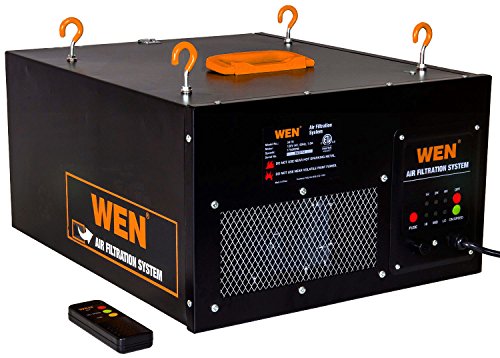
WEN 3410 3-Speed Remote-Controlled Air Filtration System (300/350/400 CFM), Basic w/ RF Remote (400 CFM) , Black
Includes a 1-micron filter and a 5-micron pre-filter, both of which can be easily replaced
As an affiliate, we earn on qualifying purchases.
As an affiliate, we earn on qualifying purchases.