
TL;DR
Moving your rig away from your workspace and into a closet with proper ventilation can drastically reduce noise and heat. Acoustic foam helps with reflections but isn’t enough alone; structural solutions and strategic placement make all the difference.
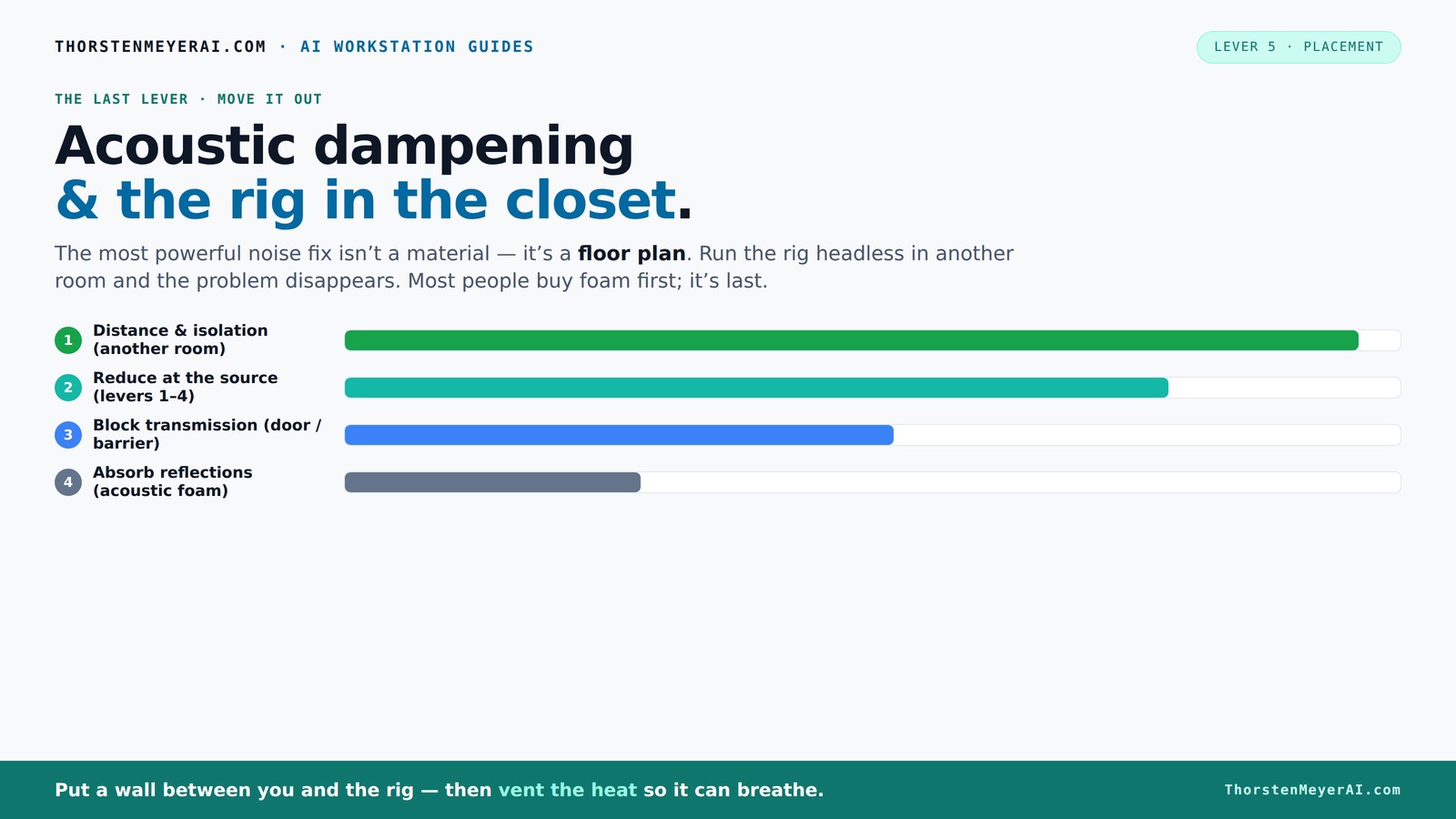
Acoustic dampening
& the rig in the closet.
The most powerful noise fix isn’t a material — it’s a floor plan. A rig you can’t hear because it’s in another room beats any amount of foam. Tap the approaches in Part 1 to see what actually works.
(another room)
(levers 1–4)
(door / barrier)
(acoustic foam)
Contain the noise, not the heat
Key Takeaways
- Moving your rig into another room or closet is the single most effective noise reduction method.
- Proper ventilation is essential when placing a heat-generating machine in a sealed space; passive vents alone won’t cut it.
- Acoustic foam softens reflections but doesn’t block sound; use barriers and decoupling for best results.
- Placement and airflow are key: position your equipment to maximize cooling and minimize noise escape.
- A combination of strategic placement, ventilation, and structural dampening beats buying foam alone.
soundproof computer closet enclosure
As an affiliate, we earn on qualifying purchases.
As an affiliate, we earn on qualifying purchases.
Why Distance and Isolation Are Your Best Noise Fighters
Distance is the simplest, most effective way to silence a noisy rig. When you put your machine in another room—say, a closet or basement—the sound barely reaches you. It’s like turning down a speaker by walking away. This method is so powerful that even the best foam panels can’t compete with the quiet that comes from separation.
Imagine your AI rig tucked away in a closet, while you work on your laptop at your desk. The noise level drops to a whisper. According to research, every doubling of distance can cut sound intensity by about 6 dB, making your environment noticeably quieter. This isn’t just about comfort; it’s about reducing auditory fatigue and creating a more focused workspace. The tradeoff, however, is convenience—your rig is less accessible for maintenance or upgrades. But for those prioritizing silence, the benefits often outweigh these inconveniences.
How to Make a 'Rig in the Closet' Work Without Overheating
Putting a high-power rig in a closet sounds perfect—quiet and out of sight. But heat buildup is the big risk. If you seal the space tight, trapped heat will cause your components to throttle and fans to roar. The trick is to set up proper airflow, which is crucial because overheating can lead to reduced performance, hardware failure, or even permanent damage. Ensuring adequate ventilation extends the lifespan of your components and maintains consistent performance.
Install passive vents or small, quiet exhaust fans to pull hot air out and draw cooler air in. Use a temperature-controlled fan setup or a purpose-built soundproof cabinet with ducted cooling. For instance, a sealed cabinet with exhaust fans can keep noise down while dissipating thousands of watts of heat effectively. The key is to balance soundproofing with airflow—too much sealing traps heat, but too little allows noise to escape. The tradeoff involves complexity and cost; better cooling solutions require investment but are vital for safe operation.
For more detailed tips, check out our guide on reducing heat and noise in a high-power AI workstation.
Acoustic Dampening: Foam, Barriers, and What Really Works
Acoustic foam and dampening panels are popular, but they only absorb sound—no matter how thick or dense. For more on soundproofing techniques, see our guide on soundproofing methods. They reduce echoes inside a room but do little to stop noise from escaping. Think of foam as softening a room’s echo, not stopping noise from leaking out. This means that while foam can make your room sound better internally, it doesn't significantly reduce the sound that travels outside, which is often the main concern.
To contain sound effectively, you need a barrier—like a solid door or dense wall panel—that prevents sound waves from passing through. For airborne noise, a sealed room or cabinet with acoustic panels can cut out 80-90% of sound, but only if the room is properly sealed and the panels are well-placed. For structure-borne noise, anti-vibration pads or rubber feet under your rig can kill low-frequency hums traveling through the floor or desk. This is crucial because vibrations can carry noise into surrounding structures, amplifying the perception of sound.
This combination of barriers and decoupling is what really makes your setup quiet. The tradeoff involves increased cost and complexity, but the results—significantly reduced noise leakage—are often worth it for a dedicated, silent workspace.
Placement Tips: Position Your Equipment for Maximum Quiet and Efficiency
Where you place your rig affects both noise and heat management. For placement tips, check out placement strategies. Keep it away from your workspace—preferably in a closet, basement, or spare room—because proximity increases noise distraction and heat transfer. If you must keep it nearby, use isolation pads to reduce vibration transfer and prevent the rig’s hum from traveling into your desk or floor. Additionally, position intake and exhaust vents carefully to maximize airflow and cooling efficiency. Proper placement ensures that hot air is expelled efficiently without recirculating within the enclosure, which can cause overheating.
Think about the airflow path: hot air should exit through ducted fans or vents, pulling in cooler air from outside the enclosed space. This setup prevents heat from pooling and keeps noise down. Remember, a well-ventilated closet with a small exhaust fan is better than a sealed box that cooks your components. Proper placement and ventilation are a balancing act—missteps can lead to increased noise, heat, or both, reducing your setup’s reliability and longevity.
Comparing the Top Placement and Dampening Strategies
| Strategy | Effectiveness | Cost | Best For |
|---|---|---|---|
| Moving Rig to Another Room | Very high | Low (depends on space) | Max noise reduction, minimal dampening needed |
| Sealed Closet with Ventilation | High (if ventilated) | Moderate to high | Quiet, cool operation in a small space |
| Acoustic Foam Panels | Moderate | Low to moderate | Reducing echo, minor noise leak |
| Anti-vibration Pads | Low to moderate | Low | Reducing structure-borne hum |
Practical Steps to Set Up Your Quiet, Cooler Rig in a Closet
- Choose a well-ventilated closet or cabinet space.
- Install passive vents or small exhaust fans for airflow.
- Place anti-vibration pads under the rig to reduce hum.
- Line the interior with acoustic foam for minor echo control.
- Run network cables through a door or wall breach to keep everything accessible.
- Monitor temperature regularly to prevent overheating.
Follow these steps, and you’ll have a setup that stays cool, quiet, and efficient.d efficient. For detailed cooling options, see our guide on liquid vs. air cooling for inference rigs.